

Create and use a project
Create a project and start chats under it so related content stays under one theme.
Last updated on
Chats about the same theme can be managed together in a project. For the concept, see Projects.
Create a project
The entry is Projects in the left sidebar: with no projects yet, click Create your first project; once you have projects, this area shows project names and a +.
Enter a project name
Enter the name in Project name. The placeholder reads What are you working on?.
Check the generated fields
Identifier (the task-number prefix, TITU by default, described as Used as the task prefix, for example TITU-123.) and Slug (used for the project URL, optional) are generated from the project name. Edit them if you need to.
Create
Click Create project. The button is pale while the name is empty and turns dark blue once you fill it in.
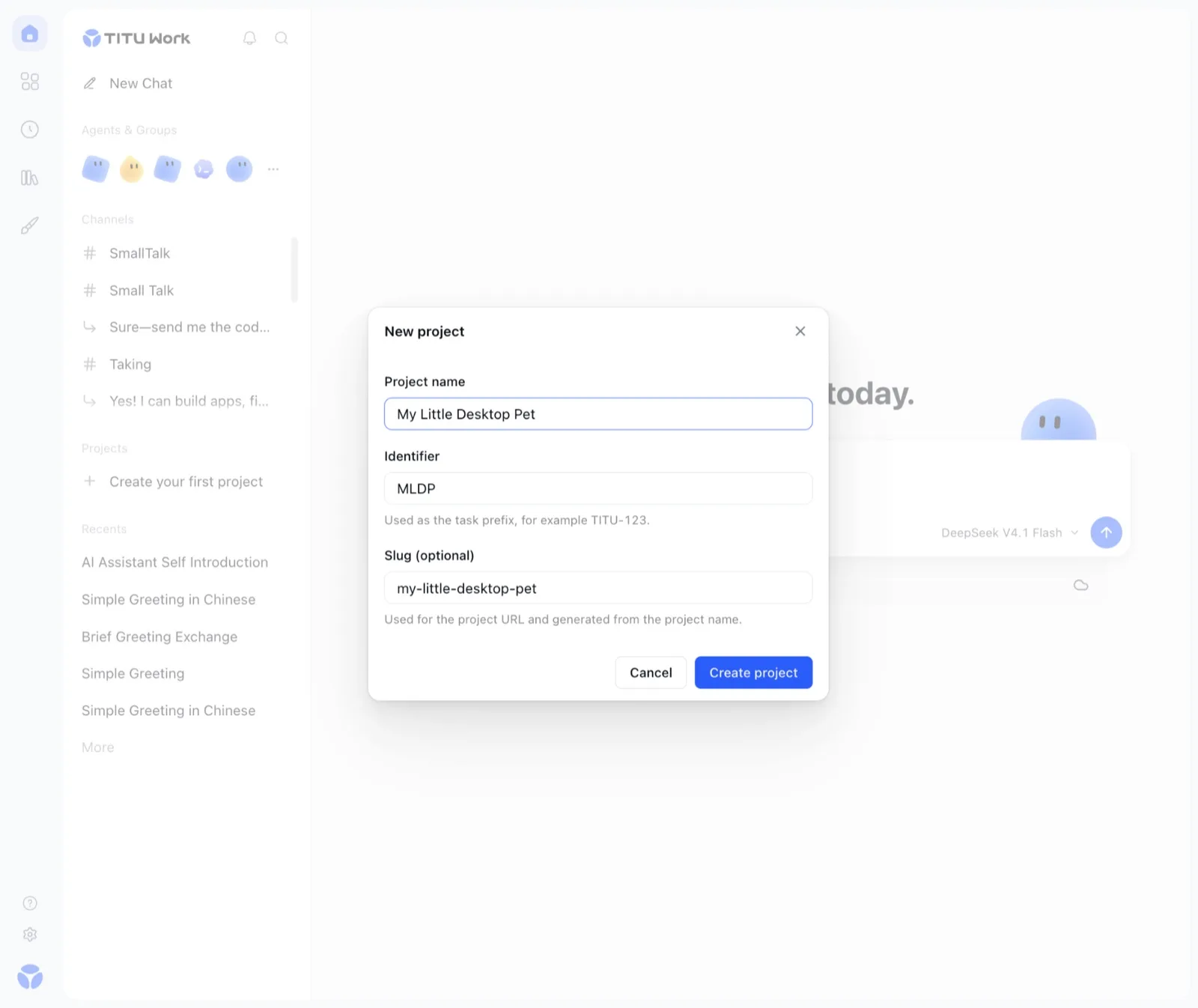
Start chats under a project
After creating it you return to the home page, where the new project appears under Projects, and a project label and an agent label appear below the input box. Describe a task in the input box and send it; chats started through the project are grouped under the project's name.
The agent can read the project's information inside a project, such as its identifier, its current status and whether it has any tasks.
Related reading
- Projects
- Scheduled tasks: you can link a project when creating a task.
Was this page helpful?